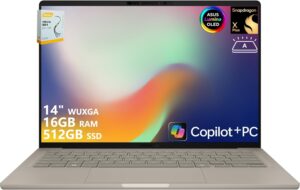
Brand:

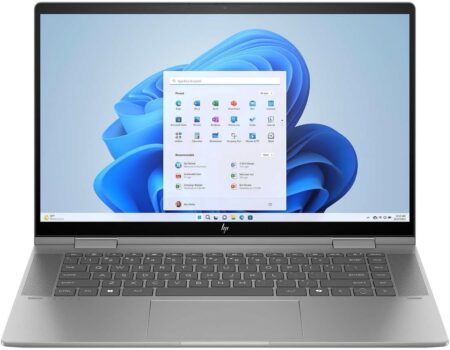
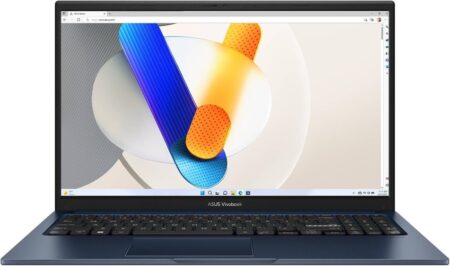
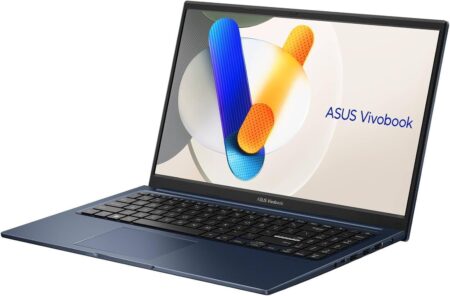
ASUS Zenbook 14 OLED Laptop, 14″ 90Hz 2.8K Touchscreen, 13th Intel i9-13900H 14-Core, Intel Iris Xe Graphics, 16GB LPDDR5 1TB SSD, Backlit KB, Thunderbolt 4, Wi-Fi 6E, FHD Camera, Win11 Home

Price range: 4,099.00د.ا through 4,199.00د.ا

  • [High-Speed Memory & Storage] Seal is opened and resealed for upgrade only. Upgraded to 16GB DDR5 SDRAM; 1TB PCI-E NVMe SSD; Windows 11 Home
  • [High-End Performance CPU] Latest powerful and efficient 13th Generation Intel Evo i9-13900H Processor (Up to 5.4 GHz with Intel Turbo Boost Technology, 24 MB Intel Smart cache, 14 Cores, 20 Threads)
  • [14″ 90Hz 2.8K Touchscreen Display] 2880 x 1800 pixels, multi touch-enabled, 500 nits, 100% DCI-P3 color gamut, 16:10 aspect ratio, Thin Bezel LCD; Powered by Intel Iris Xe Graphics
  • [Connection & Ports] Wi-Fi 6E (2×2) 802.11AX and Bluetooth 5.3 Combo; 2x USB Thunderbolt 4 / USB4 40Gbps Type-C support Power Delivery / DisplayPort through USB Type-C, 1x USB 3.2 Gen 1 Type-A support 5Gbps, 1x HDMI 2.1, 1x Headphone and microphone combo jack
  • [Additional Attributes] Full size Backlit Keyboard with Numpad, Fingerprint Reader; 1080p FHD Camera with E-Shutter; 75Whr 4-Cell lithium-ion battery (up to 6 hours battery life); 12.35″ x 8.69″ x 0.67″ inches, 3.06 lbs; Foggy Silver; 65W AC Adapter; COU 32GB USB Drive included

Professional customer service:

Purchase protection:

SKU: B0FX4J51MX Categories: , , ,
Share:

Note: We specialize in computers with personalized configurations. The factory packaging may be unsealed for installation of upgrades to meet the advertised specifications. The modified product will undergo professional testing and then resealed.

Series: ASUS Zenbook 14 OLED Laptop

Display: 14″ 90Hz 2.8K (2880 x 1800) Touchscreen 500 nits 100% DCI-P3 color gamut, 16:10 aspect ratio Thin Bezel Display

CPU: Intel i9-13900H 14-Core Processor (Up to 5.4 GHz with Intel Turbo Boost Technology, 24 MB Intel Smart cache, 14 Cores: 6 Performance Core + 8 Efficient Core, 20 Threads)

Graphics: Intel Iris Xe Graphics

Memory: Upgraded to 16GB DDR5 SDRAM 4800 MHz

Hard Drive: Upgraded to 1TB NVMe M.2 SSD

Operating System: Windows 11 Home

Touchscreen: Yes

Optical Drive: No Optical Drive

Keyboard: Fullsize Backlit Keyboard with Numpad, Fingerprint Reader

Wireless Connectivity: Intel Wi-Fi 6E AX211 (2×2)

Bluetooth: Bluetooth 5.3

Camera: 1080p FHD Camera with E-Shutter

Power: 75Wh Lithium-Ion with 65W AC Adapter

Ports: 2x USB-C Thunderbolt 4 / USB4 40Gbps (Power Delivery and DisplayPort 1.4), 1x USB 3.2 Gen 1 (5Gbps); 1x HDMI 2.1; 1x Headphone / microphone combo jack

Size and Weight: 12.35″ L x 8.69″ W x 0.67″ H inches, 3.06 lbs

Color: Foggy Silver

COU 32GB USB Drive included

Weight 3.13 kg
Dimensions 31.39 × 22.1 × 1.73 cm
Brand

Product Dimensions

‎31.39 x 22.1 x 1.73 cm; 3.13 kg

Item model number

‎UX3402VA-IS9

Series

‎Zenbook 14 OLED

color

‎Foggy Silver

Form factor

‎Ultra-Portable

Standing screen display size

‎14 Inches

Screen Resolution

‎2880 x 1800 pixels

Resolution

‎2880×1800 Pixels

Processor Brand

‎Intel

Processor Type

‎Intel Core i9

Processor Speed

‎3 GHz

Processor Count

‎14

RAM Size

‎16 GB

Memory Technology

‎Lpddr 5

Computer Memory Type

‎DDR5 SDRAM

Maximum Memory Supported

‎16 GB

Memory Clock Speed

‎4800 MHz

Hard Drive Size

‎1 TB

Hard Disk Description

‎SSD

Hard Drive Interface

‎PCIE x 4

Audio Details

‎Speakers

Graphics Coprocessor

‎Intel Iris Xe Graphics

Graphics Chipset Brand

‎Intel

Graphics Card Description

‎Integrated

Graphics RAM Type

‎Shared

Connectivity Type

‎Wi-Fi

Wireless Type

‎802.11ax

Number of USB 3.0 Ports

‎1

Number of HDMI Ports

‎1

Optical Drive Type

‎No Optical Drive

Power source

‎AC & Battery

Hardware Platform

‎PC

Operating System

‎Windows 11 Home

Average Battery Life (in hours)

‎6 Hours

Item Weight

‎3.13 Kilograms

ASIN

B0FX4J51MX

Date First Available

4 February 2026

Manufacturer

‎ASUS

Capacity

16GB RAM | 1TB SSD

Style

Windows 11 Home, Windows 11 Pro

Reviews

There are no reviews yet.

Be the first to review “ASUS Zenbook 14 OLED Laptop, 14″ 90Hz 2.8K Touchscreen, 13th Intel i9-13900H 14-Core, Intel Iris Xe Graphics, 16GB LPDDR5 1TB SSD, Backlit KB, Thunderbolt 4, Wi-Fi 6E, FHD Camera, Win11 Home”

Your email address will not be published. Required fields are marked *

You have to be logged in to be able to add photos to your review.

Fast and safe delivery

Richard McClintock, a Latin scholar from Hampden-Sydney College, is credited with discovering the source behind the ubiquitous filler text. In seeing a sample of lorem ipsum, his interest was piqued by consectetur—a genuine, albeit rare, Latin word. Consulting a Latin dictionary led McClintock to a passage from De Finibus Bonorum et Malorum On the Extremes of Good and Evil, a first-century B.C. text from the Roman.

Carried only by professionals

So when is it okay to use lorem ipsum? First, lorem ipsum works well for staging. It’s like the props in a furniture store—filler text makes it look like someone is home. The same Wordpress template might eventually be home to a fitness blog, a photography website, or the online journal of a cupcake fanatic. Lorem ipsum helps them imagine what the lived-in website might look like.

Shopping cart
Sign in

No account yet?

Create an Account